
Saturday, 24 October, 2026
Moving this blog to AWS, part two: downsizing
After pulling the plug on a client-grade platform, I rebuilt the blog on AWS around what it actually needs: one server, Caddy, blue/green releases and Terraform.
Moving this blog to AWS, part two: downsizing
Part two of two: rebuilding the blog's AWS home around what it actually needs.
In part one I moved this blog from a $7-a-month DigitalOcean server to Amazon Web Services (AWS), built the way I would for a paying client: containers, a load balancer and Terraform, a tool that builds infrastructure from code, throughout. It worked, but it cost around $40 (£30) a month, and the database couldn't scale out without paying for a separate database server on top. So I pulled the plug.
Starting from the blog
The second time round I started from the blog, not the architecture diagram. What does a lightweight, one-author blog really need? It needs to stay up, be quick and safe to update, be backed up, and cost as little as possible. Everything else could go.
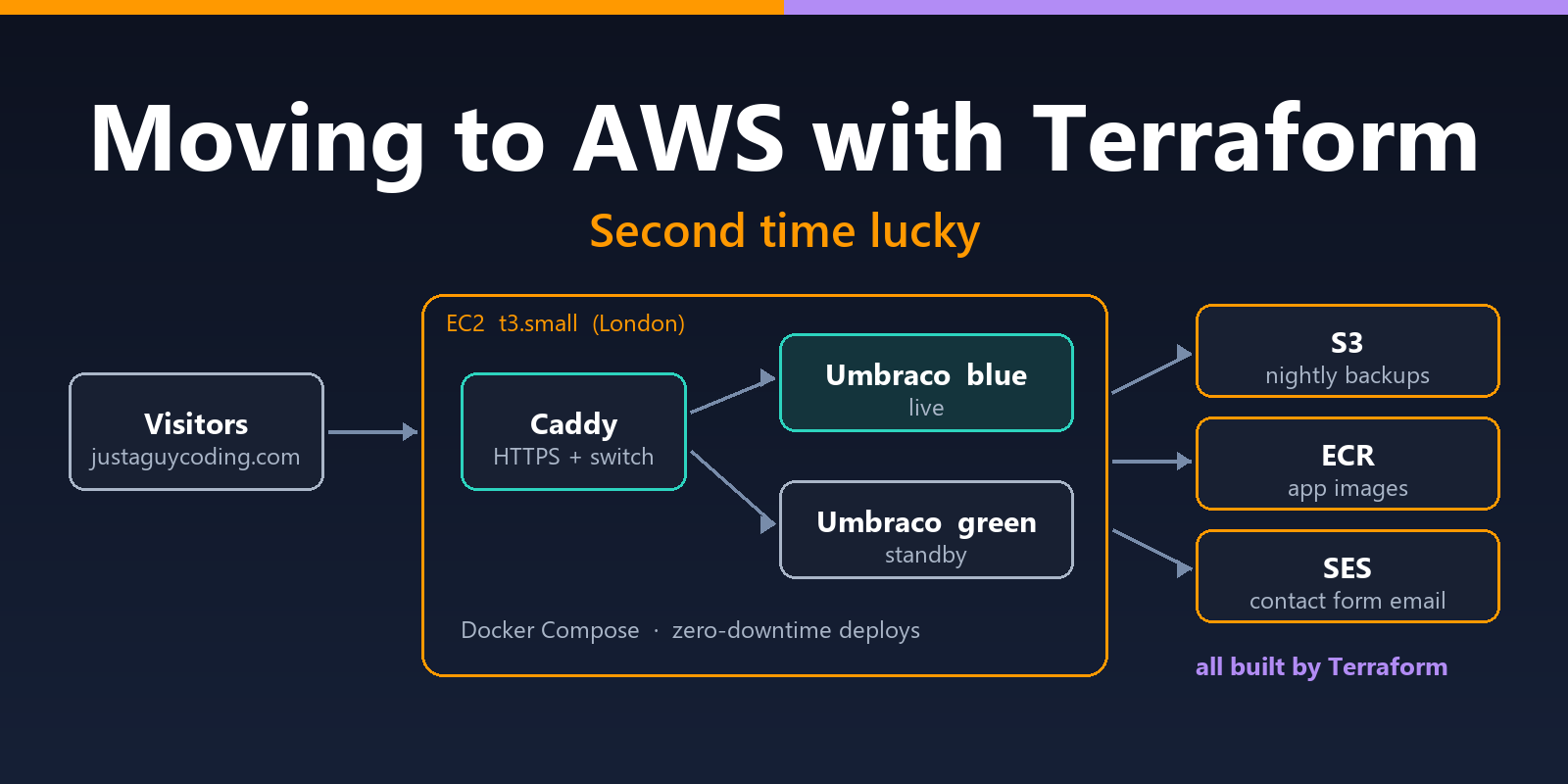
One server in London
The result is one Elastic Compute Cloud (EC2) server, one of Amazon's virtual machines, in London. I chose London because it's the AWS region closest to me and to a UK audience, so pages have less distance to travel, and the site and its data stay in the UK. Docker Compose, a tool for running a set of containers together on one machine, runs the whole site.
At the front sits Caddy, an open-source web server that replaced both the load balancer and the certificate service from part one. Caddy fetches and renews its own HTTPS certificates, free of charge, from Let's Encrypt, a non-profit certificate authority. It also does the load balancer's job: it passes visitors to the live copy of the site, and switches them smoothly to a new copy when I release an update. Its entire configuration is a few lines long, and it saves the $20 (£15) a month the load balancer cost.
Behind Caddy are two copies of the site, labelled blue and green: one is live, and the other holds the previous version for an instant rollback. Every night the database and images are backed up to Amazon S3 (Simple Storage Service), AWS's file storage, and kept for a month. The contact form sends its email through Amazon's Simple Email Service (SES), using the server's own AWS identity, so there's no email password stored anywhere.
The server doesn't accept SSH (Secure Shell) connections, the usual route into a Linux machine; I manage it through AWS's own tools instead, so there are no keys to lose.
All of this runs for about $23 (around £18) a month, compared with $7 on DigitalOcean.
| The new setup at a glance | |
|---|---|
| Server | One EC2 t3.small (2GB of memory) in London, running Docker Compose |
| Traffic and HTTPS | Caddy, with free Let's Encrypt certificates, renewed automatically |
| The site | Blue and green copies, each with its own SQLite database |
| Backups | Database and images to S3 every night, kept for 30 days |
| Releases | Images in Amazon's Elastic Container Registry (ECR), with the last five kept for rollback |
| Amazon SES, with no passwords stored | |
| Infrastructure | Terraform, with its state in S3 and a built-in lock file instead of a DynamoDB table |
| Cost | About $23 (around £18) a month: $17 for the server, $3.65 for a fixed IP address, $2 for the disk, and pennies for storage and email |
How a release works
Releases are handled by two PowerShell scripts on my PC. One ships a new version of the site; the other copies the live content and images back down, so I can work on them locally. The release script gives the server its instructions through AWS Systems Manager, Amazon's tool for managing servers remotely.
- The script builds the new version of the site and uploads it to AWS.
- The new version starts on the standby copy, with a copy of the live database.
- A check waits until the blog's front page loads correctly, not just until the server answers.
- Caddy switches visitors over to the new copy.
- The old copy stops, but stays on disk for an instant rollback.
If any step fails, the live site isn't touched.
Conclusions
Terraform is superb for spinning things up and tearing them down. Because part one's network, load balancer, container cluster, certificates and permissions were all defined in code, it came down as cleanly as it went up. The new setup went up the same way, and the same code can rebuild it from scratch whenever I need to. The code doubles as the documentation, too: six months from now, I won't have to remember why something is configured the way it is.
AWS is a complex beast, and costs can run away from you if you're not careful. Every AWS account comes with hundreds of default resources spread across 17 regions, and anything you create keeps billing whether anyone uses it or not. Three habits keep that in check:
- Everything is labelled. Terraform stamps every resource it creates with tags, simple name-and-value labels: Project: jagc (short for Just A Guy Coding) says which project it belongs to, and ManagedBy: terraform says it should only ever be changed through Terraform. AWS Resource Explorer, Amazon's search tool for an account, then finds everything belonging to the blog with a single search, and a resource group, a saved list of resources, gathers it all on one page.
- The account is locked to London, so nothing can appear in another region by accident.
- Monthly budgets in AWS's billing tools keep an eye on the spend.
Blue/green releases mean no downtime. A new version starts alongside the live site and only takes over once it has proved it works. If it fails its checks, visitors never see it, and the previous version is always one switch away. During one test release I loaded the blog every second from start to finish: all 97 requests succeeded.
I came out of it with up-to-date, hands-on AWS and Terraform experience, and a blog that's sturdier and simpler to look after than it's ever been.
 Copyright @ 2010-2026